


Webhooks allow you to send and receive data with other systems to perform actions like update a CRM record, trigger a message or email, or automate a survey reward incentive. Webhooks can be challenging for the average user, however, because they need to be customized to the other system, rather than create them however you want in Discover. It's a little less programming and a little more translating to implement.
To help assist, here are some examples of different types of webhooks.
The simplest webhook is a basic request to a URL with no authentication. It's similar to browsing to a website (type in the URL in a browser) and viewing the result (the web page). But, since webhooks operate a server to server communication, it's more like Discover walking up to a door and knocking. The door always opens and information passes freely.
For a real working example of this, we can use a website that generates random user information, https://randomuser.me. If you browser to randomuser.me, you will see a random picture, name, and other created contact information.
This site also supports an API for server to server communication that requires no authentication, similar to how the website behaves. In Discover we can create a basic GET webhook with the endpoint targeting the API address of https://randomuser.me/api with the authentication type set to None. We'll set the event type to Page submit and choose our first page, meaning the webhook will run when the user clicks next on the first page of the survey.
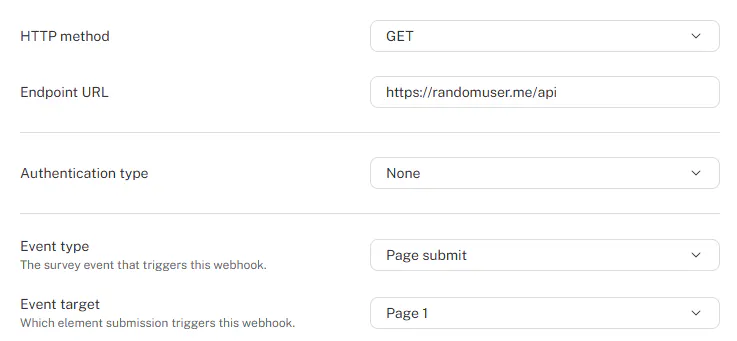
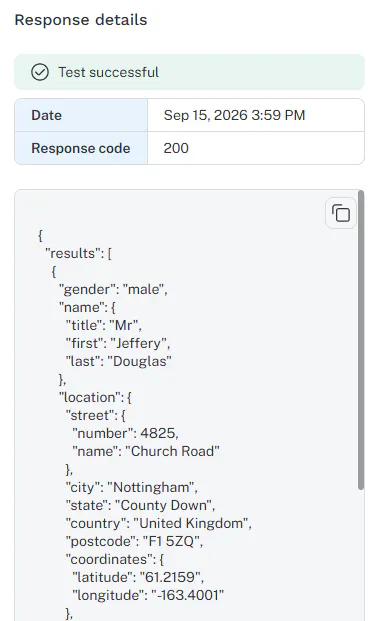
If we test the webhook, we get back a host of information about a randomly created user in JSON, a format commonly used to send and receive information that supports structures or groupings of information:
{"results":[{"gender":"male","name":{"title":"Mr","first":"Luka","last":"Philippe"},"location":{"street":{"number":592,"name":"Rue de L'Église"}
...
}
Discover stores all of this information with the respondent data, and we could use various methods to parse certain parts of the JSON if we wanted to return, for example, the first name and use it in a question.
Similar to passing variables in the survey URL, webhooks can be programmed to expect data to be passed in the URL. With randomuser.me, for example, if you want to force the user to be from Great Britain, randomuser.me has programmed their API in such a way that a country code can be passed in as a URL parameter.
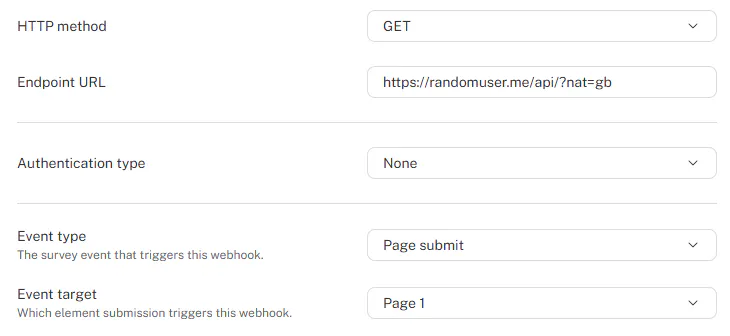
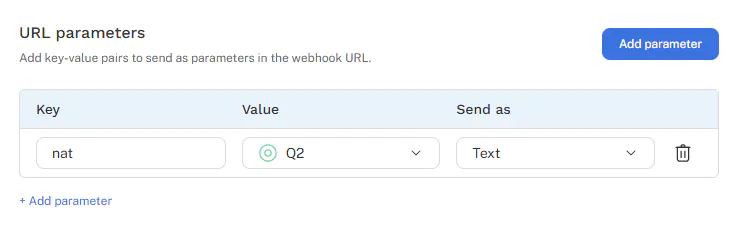
Discover's webhooks support dynamic URL parameters if you want to pass survey information in the URL. For example, we asked a respondent which country they lived in, we could pass that as a URL parameter. In this case we would leave the Endpoint URL as https://randomuser.me/api and then in the parameters tab, set up a URL parameter with the Key named nat (what Random User requires it to be called) and then the Value as Q2, the question where I ask the country. Sending as text sends the answer name, rather than the answer number (1, 2, 3, etc.).
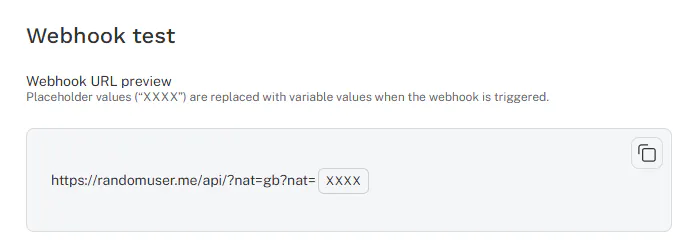
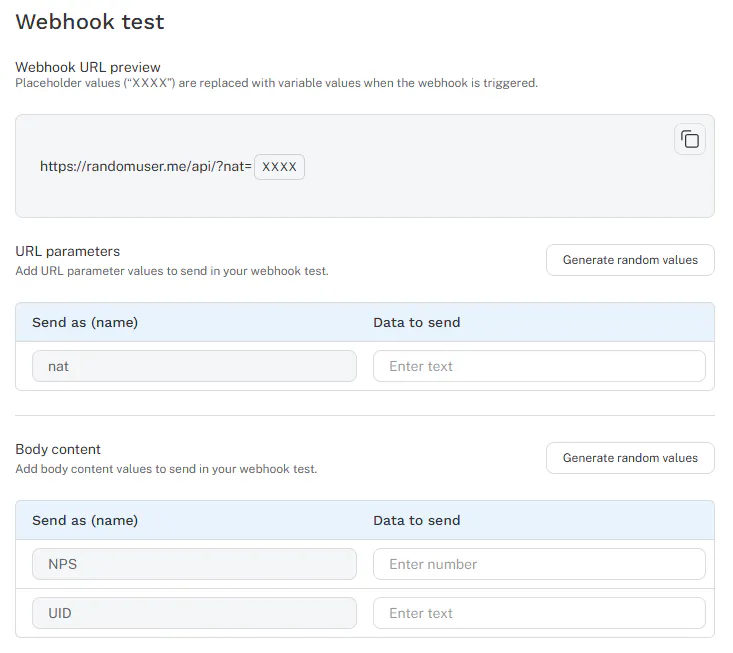
Testing the webhook in Discover shows that the URL parameter gets appended to the base URL
For more complicated messages, your external system might require the content structured in a specific way. In this case, we can add Body Parameters and Discover will automatically write a JSON structured message that gets sent to the external system rather than passing information over a URL. For example, if you had collected an NPS score in a survey and had previously passed in a contact ID in the survey URL, you might need to return them as a JSON package rather than pass them in the URL. We can set this up in Discover under the Body Content tab of the webhook:
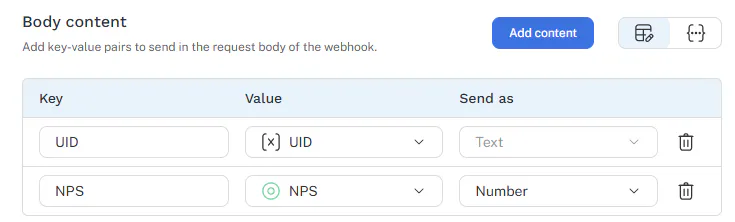
Assuming the UID value passed in was ABC123 and the NPS score was an 8, this will send a JSON package to the URL like
{
 "UID" : "ABC123",
 "NPS" : "8"
}
Remember that the Key name and the format is determined by the external system, so following their documentation is required to make sure the transfer of information happens correctly.
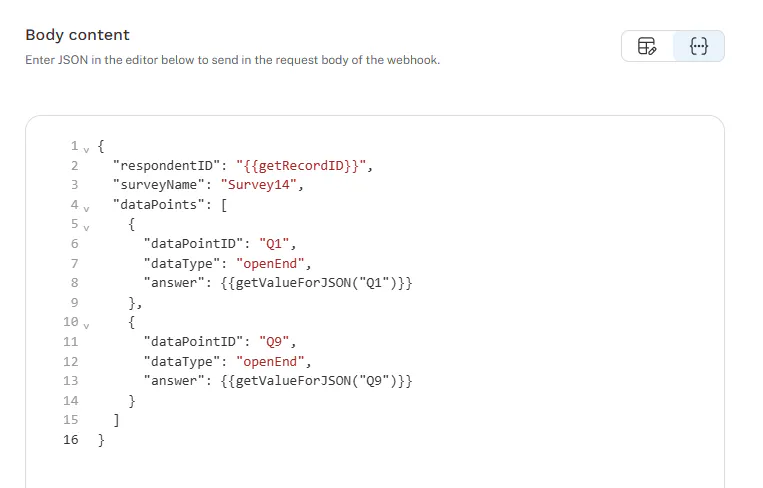
Sometimes you might be passing information in a way that requires some special layout, or perhaps nesting variables together. For example, if you are working with a data quality platform, you might need to pass in the survey name and then a nested structure of question type and answers like this:
{
  "respondentID": "ABC123",
  "surveyName": "Survey14",
  "dataPoints": [
    {
      "dataPointID": "Q1",
      "dataType": "openEnd",
      "answer": "The checkout process was very easy"
    },
    {
      "dataPointID": "Q9",
      "dataType": "openEnd",
      "answer": "Everything was great, no improvements needed"
    }
  ]
}
For these type of complicated structures, you can build custom body content exactly to your needs by switching to the custom JSON editor and utilizing various scripting functions, especially getValueForJSON() instead of the more typical getValue() to ensure special characters are handled appropriately.
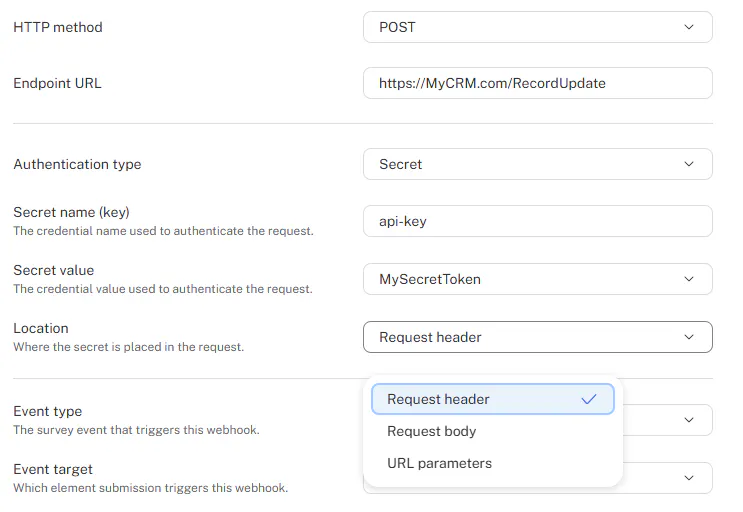
In the examples above, you can see how powerful webhooks can be to send and receive information. Most important systems will require you to authenticate the webhook, or confirm it's coming from a trusted source, similar to logging in to a website with a password.
Again, this is going to depend on how the external system wants you to authenticate (in the URL, as a header in the request, or in the JSON message body). Discover can securely store your authentication secrets and place them whever you need them without exposing them to the browser of the survey respondent.
We've made testing webhooks very powerful so you can make sure everything is working correctly without manually clicking through your survey to hit a specific page or survey ending. Testing lets you preview the URL and body content, plus generate random values or specify your own and connect to the external system directly.
The response details shows error messages or success codes, plus any response from the external system.
While we don't have control over these external systems, you can reach out to our support team and we'll help the best we can.